Audience: Study Manager, Sponsor Admin
Purpose: Provide a clear reference for what each status means, where to find it, how statuses transition, and which status to select when more than one could apply.
What are Site/Campaign Statuses?
Statuses show where a site or campaign is in its setup, opt-in, enrollment, and closeout journey.
Use statuses to:
Track lifecycle progress
Align site and sponsor visibility
Support consistent reporting and operational decisions
If multiple statuses could apply, select the most progressed applicable state.
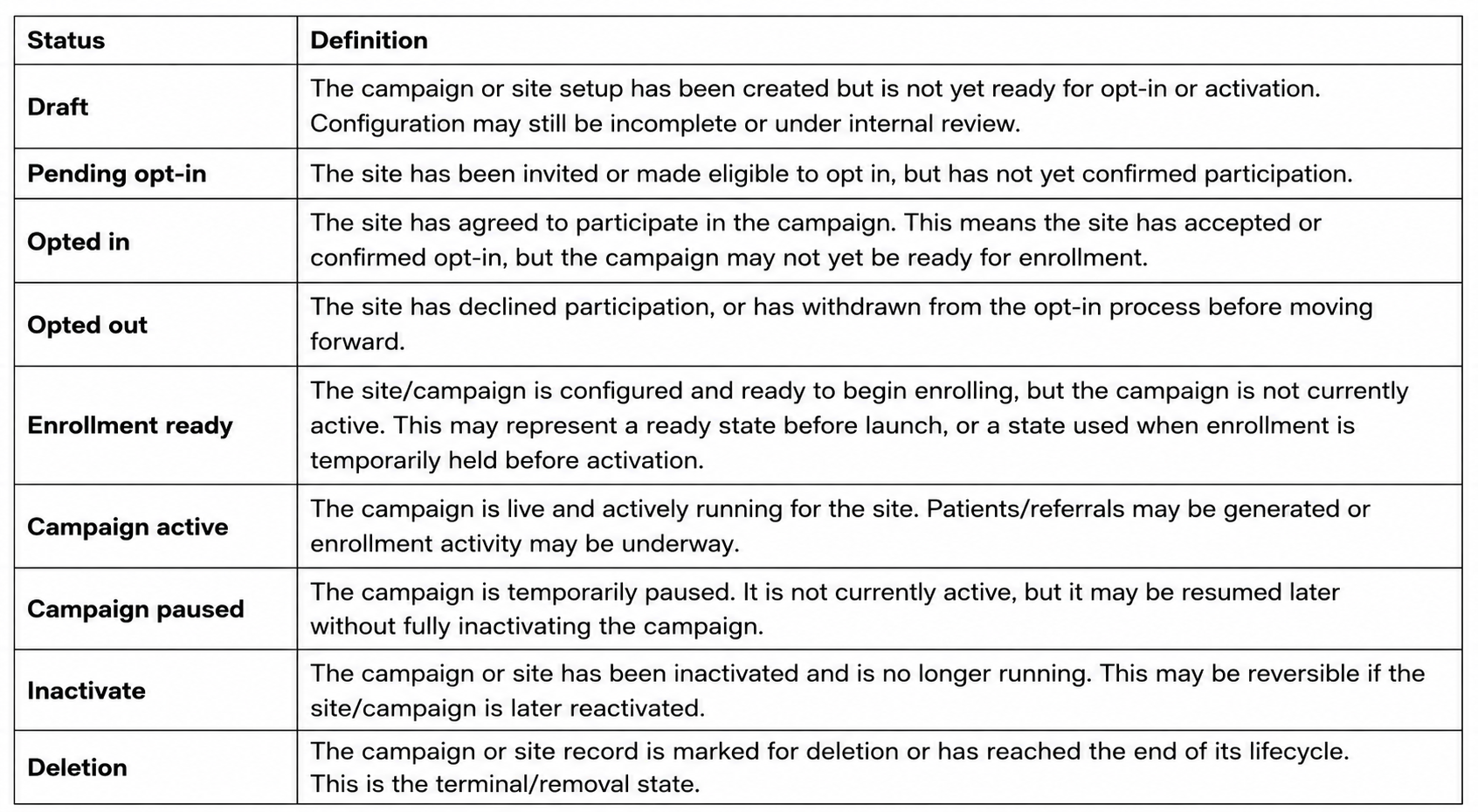
Status Definitions:
Important Note
These statuses can technically overlap. For example, a site can be Opted in and also have a Campaign active. In practice, the selected status should reflect the most progressed applicable state.
Status Flow Overview
Main forward path:
Draft → Pending opt-in → Opted in → Enrollment ready → Campaign active → Inactivate → Deletion
Reversible paths:
Opted in ↔ Opted out
Opted in ↔ Enrollment ready
Enrollment ready ↔ Campaign active
Campaign active ↔ Campaign paused
Campaign active ↔ Inactivate
Additional paths:
Draft → Deletion
Campaign paused → Inactivate
How to Choose the Right Status
Use Draft for setup-in-progress.
Use Pending opt-in until the site confirms yes/no.
Use Opted in once participation is accepted.
Use Enrollment ready when configured but not live.
Use Campaign active when enrollment/referral activity is live.
Use Campaign paused for temporary operational pause.
Use Inactivate when activity is stopped but may resume.
Use Deletion for terminal end-of-lifecycle.
Where do I find it?
Where you can see the site status depends completely on your role. Please refer to Where can I see site status in Honey for additional guidance.
What to expect
The selected status updates what sponsors and sites see for progress tracking.
Status changes may affect reporting and how work is prioritized.
Troubleshooting
The status didn’t change after I saved
Clear cache, refresh the page and check again. If it still doesn’t update, contact Trialbee Support with the site/campaign name and the status you tried to set.
Still need help?
Contact Trialbee Support at support@trialbee.com for any questions or additional guidance.
Related articles
Where can I see site status in Honey?
Was this article helpful?
That’s Great!
Thank you for your feedback
Sorry! We couldn't be helpful
Thank you for your feedback
Feedback sent
We appreciate your effort and will try to fix the article